
cCarbon for AI assistants
cCarbon's market intelligence, in your AI assistant.
Ask Claude or ChatGPT a question about clean fuel standards, cap-and-trade or sustainable fuels, and get cCarbon's own numbers and research back — with the report and the date each figure came from.
How it works
Ask the way you'd ask an analyst.
Your assistant looks the answer up in cCarbon's data while you watch, and shows you the report and date behind every number.
What were California LCFS renewable-diesel credits each quarter in 2025, and where does cCarbon's commentary say supply is moving?
- Looking up cCarbon's clean fuels data0.4s
- Reading California LCFS credits, 20250.6s
- Searching cCarbon commentary and webinars0.9s
California LCFS credits generated by renewable diesel, 2025:
- 2025 Q13,074,293tCO2e
- 2025 Q23,518,031tCO2e
- 2025 Q32,541,416tCO2e
Q3 sits 27.8% below Q2. On where supply is moving, cCarbon's Witnessing the Renewable Diesel Boom webinar covers the Oregon-to-California shift and the headroom left in California's diesel pool.
- Renewable Diesel Trend Sheet, Q4 2025 as of 18 Feb 2026
- Witnessing the Renewable Diesel Boom webinar · Nov 2023
-
1It finds the right data
You ask the question you would ask a colleague. Your assistant works out which cCarbon series and reports answer it.
-
2The numbers are cCarbon's
Figures come straight from cCarbon's published data, with the unit and the period they belong to.
-
3The source comes with it
The report and its date sit alongside the answer, so anything you pass on can be checked in seconds.
Set it up
Adding cCarbon to your assistant
You do this once, and it stays. Both apps work the settings out for themselves by checking the server — your job is to paste the address, confirm what they found, and sign in.
-
Open Customize → Connectors
In Claude's left sidebar, click Customize, then the Connectors tab. Click Add, top right.
-
Name it, paste the address, click Continue
Name cCarbon MCP server URL the address below On a trial, use the address in your welcome email.
-
Check both lines say Detected
Claude checks the server and fills these in for you:
- Authentication Sign in now Detected
- OAuth client Register automatically Detected
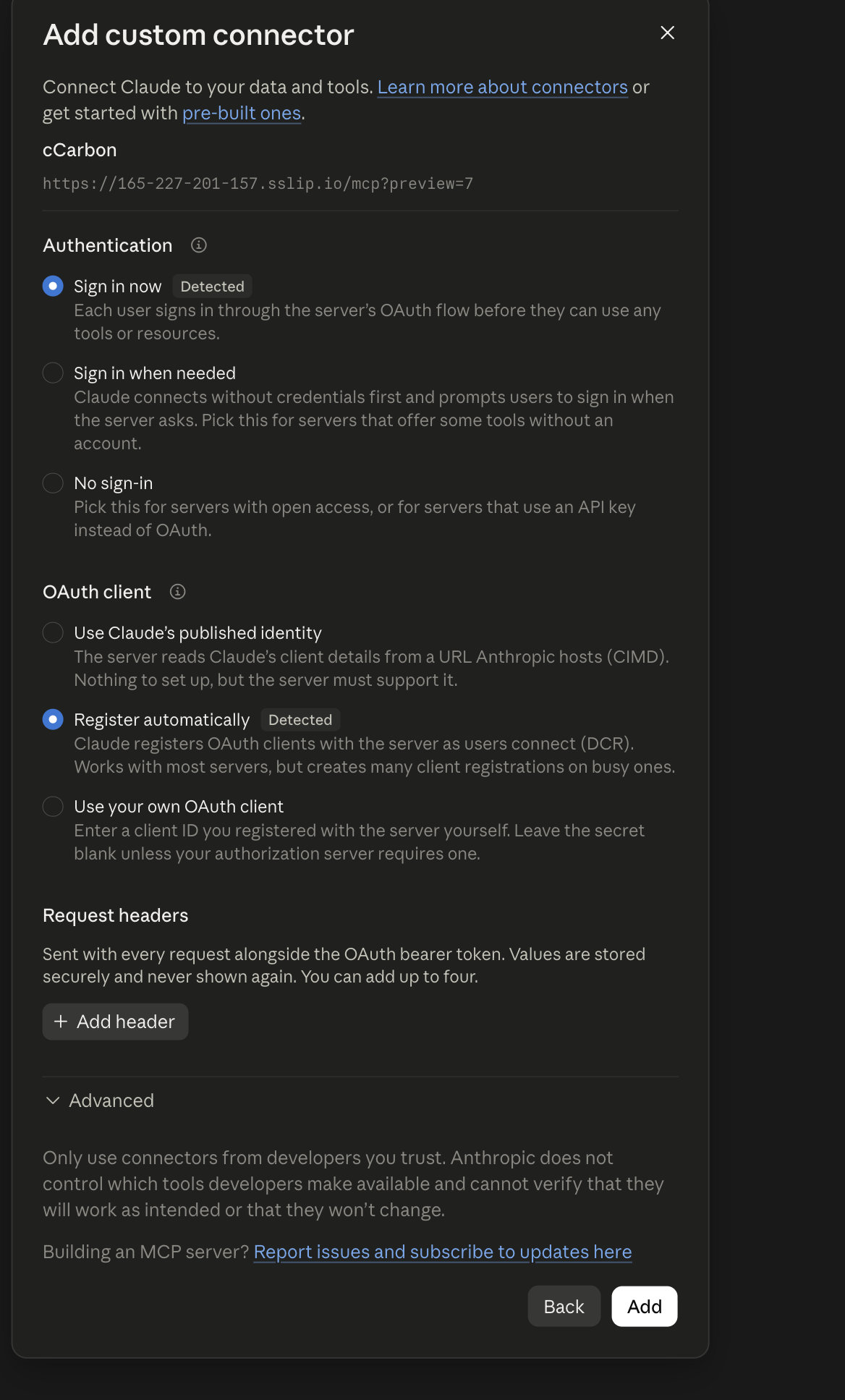
If OAuth client isn't on Register automatically, select it. If that doesn't work, email us.
-
Click Add, then Connect
Sign in with the details we sent you, then choose your access level.
No window appeared? Allow pop-ups for the site, then click Connect again.
-
You'll see seven tools
The connector page shows Disconnect and a list of 7 read-only tools. That's it — you're connected.
Claude asks permission the first time it uses one. They only read, so Always allow is fine.
If a chat later says the connector needs authentication, your sign-in has expired. Open the connector and click Reconnect.
-
Open Settings → Plugins → Browse plugins → Create
The dialog is titled New App.
-
Name it and paste the address
Under Connection, choose Server URL, then paste:
On a trial, use the address in your welcome email.
-
Set Authentication to OAuth
There's no API key box, and there won't be. Signing in is what lets cCarbon show you your own subscription.
-
Open Advanced OAuth settings and check it filled itself in
ChatGPT reads these off the server. Nothing to change:
Registration method Dynamic Client Registration (DCR) Auth, Token, Registration URLs filled in Scopes openidprofileccarbon:read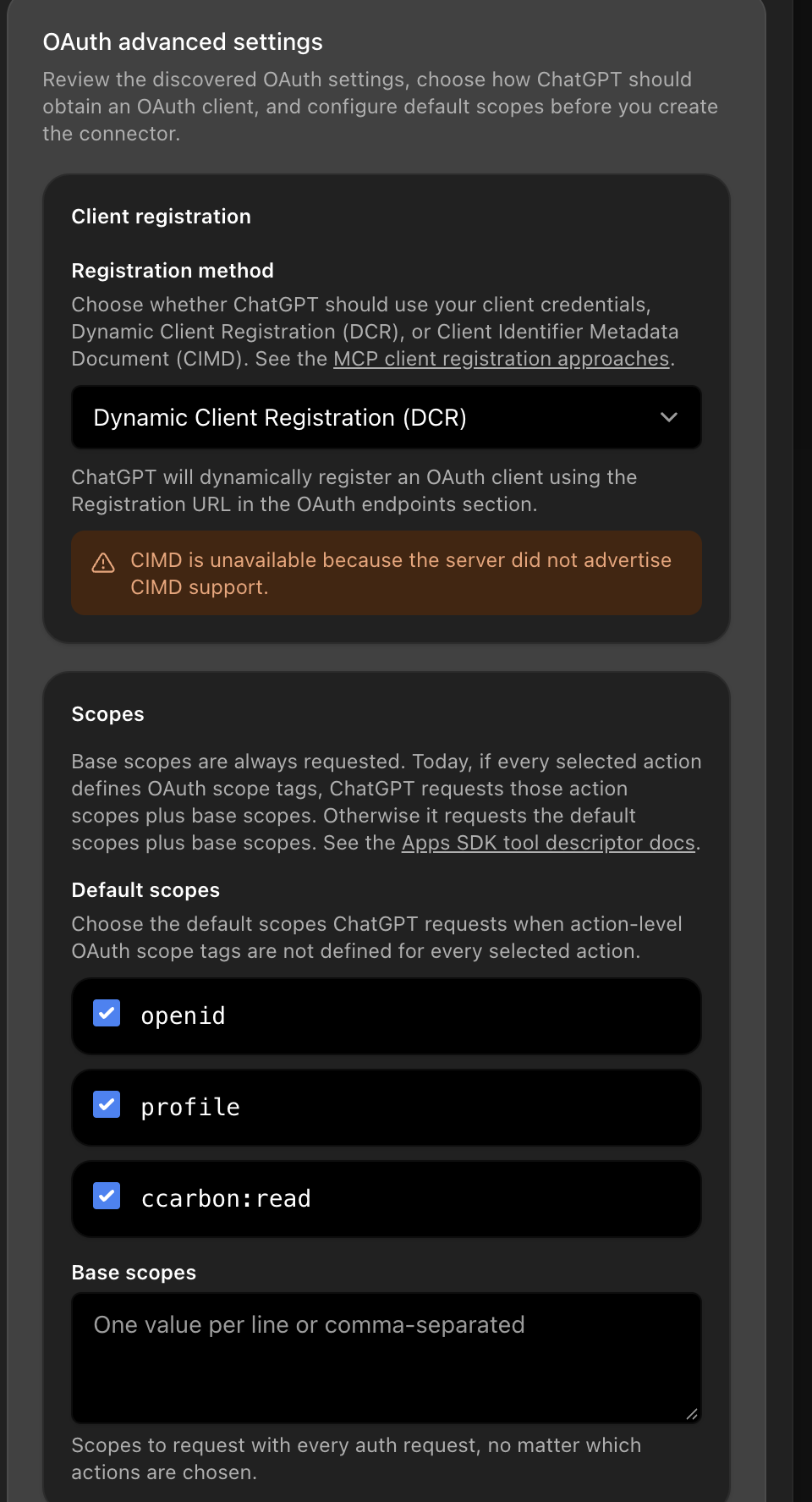
If those URLs are blank, ChatGPT can't reach the server. Email us before going further.
-
Tick I understand and want to continue, then Create
-
Open it, click Connect another account
Sign in with the details we sent you, then choose your access level. Your account then shows under Connected accounts.
No window appeared? Allow pop-ups for the site and try again.
-
“No app actions available yet” is normal
ChatGPT loads the tools the first time you use the app in a chat, not when you connect it. Open a chat, mention cCarbon by name, and they appear.
Leave Permissions on Allow low-risk actions — everything cCarbon does is read-only.
Then ask
“Using cCarbon — what was the California LCFS quarterly average credit price in 2025Q4? Cite the metric and as-of date.”
In ChatGPT, mention cCarbon by name. In Claude, just ask.
Worth knowing
- Your access level decides which markets answer. You choose it when you sign in.
- Claude connects from Anthropic's servers, not your laptop, so a VPN makes no difference.
- Stuck? Email us with the step number.
Using something else? Any assistant that supports custom MCP connectors can use the same address. Claude and ChatGPT are the two we've walked through end to end — for anything else, ask us and we'll help you through it.
Try these queries
What you can ask
Numbers, research, or both in one answer — each with its source attached.
- Numbers
What were California LCFS renewable-diesel credits each quarter in 2025?
- Numbers
Compare the average renewable-diesel incentive per gallon under CA LCFS, OR CFP and WA CFS over the last six quarters.
- Numbers
Break down global renewable-diesel feedstock demand by feedstock — tallow, UCO, soy, canola, corn oil.
- Research
What does cCarbon's analyst note say about Canada's Clean Fuel Regulations carbon-intensity targets?
- Research
Summarise the key takeaways from cCarbon's Renewable Diesel Boom webinar.
- Both
How did California LCFS RD credits trend through 2025, and what is driving it?
Coverage
Everything you already subscribe to
The same markets, data and research you get on ccarbon.info — now answerable in a sentence.
Markets
- Clean Fuel StandardsCA LCFS · OR CFP · WA CFS · BC LCFS · Canada CFR · US RFS
- Sustainable FuelsRenewable diesel · SAF · RNG · ZEV
- Cap-and-TradeWCI CaT · Washington CCA · RGGI · Alberta TIER
- Carbon Credits and RemovalsCompliance offsets and removals
- Carbon Linked MechanismsBorder adjustment and linked instruments
What you get back
- Numbers over timeProduction, credits, incentives, feedstock demand and share of the fuel pool, quarter by quarter.
- Analyst notes and trend sheetsRead in full or searched, with the exact passage quoted back to you.
- Weekly commentary and newscCarbon's market view as it was published, ranked against your question.
- Webinar discussionsWhat cCarbon's analysts said, with the speaker and the moment they said it.
Figures are quarterly or weekly and get revised, so every one carries the date it was true on. An answer from March and an answer from June will say which is which.
Why you can rely on it
Answers you can put in front of a client
This is cCarbon's own research reaching you through a different door.
-
Every figure is sourced
The report it came from and the date it was true on travel with the number, ready to cite.
-
cCarbon's data only
Answers are drawn from cCarbon's published research and market data, the way your analysts would.
-
Your access, handled
You sign in once, and cCarbon shows your assistant the markets and reports your subscription covers.
-
Straight about the limits
Where cCarbon has yet to publish a figure, the answer tells you plainly and points at what does exist.
Access
Getting connected
This comes with your cCarbon membership. If your team already subscribes, you're set.
Already a member
Sign in and connect
Use the account you already have. Your assistant sees the same markets and reports you see when you log in to the website.
New to cCarbon
Start a trial, or talk to an analyst
Membership runs at two access levels — Essential and Analytics Pro — with an Enterprise bundle for larger teams. Each includes five user licences.
Questions
FAQ
Do I need a cCarbon membership?
Yes. You sign in with your cCarbon account, and your assistant sees the markets and reports your membership covers. If you are not a member yet, start a free trial or speak to an analyst.
Which AI assistants work?
Any assistant that supports custom MCP connectors. We have step-by-step guides for Claude and ChatGPT, the two we have walked end to end. For anything else the address is the same — ask us if you get stuck.
Where do the numbers come from?
cCarbon's published market data and research — the same trend sheets, analyst notes, commentaries and webinars behind the website and your dashboards.
How current is it?
Series are updated quarterly or weekly and revised as data firms up. Every figure carries the date it was true on.
Can my whole team use it?
Yes. Membership includes five user licences, and there is an Enterprise bundle for larger teams. Each person connects once with their own account.
Does this replace the website?
It sits alongside it. The portal, dashboards and Analytics Toolkit carry on exactly as they are — this is another way to reach the same research.
Give your AI assistant cCarbon's research and data.
https://mcp.ccarbon.info/mcp